Subcribe to our RSS feeds Add to Circles Follow us on Twitter Join Us on Facebook Follow my blog with Bloglovin
Showing posts with label Amazon. Show all posts

Thursday, April 07, 2016

Shipping Amazon Purchases to Singapore using ezBuy (Formerly 65Daigou)

The U.S dollar has weakened slightly from the highs of S$1.45 to about S$1.35 (As of writing of this article). Perhaps it is time to consider making that Amazon purchase that you have always wanted (Don't forget to get your Cashback!). Whilst Amazon does provide shipping to Singapore on certain purchases (e.g Books, Clothing and Shoes), there are also some really good deals on items that do not ship direct (e.g Electronics, Tech. Gadgets and Health Products). 

If you are interested to get a product that does not ship directly to Singapore, you can use a freight forwarding service like ComGateWay, Borderlinx or ezBuy!

In this article, we will explain and provide a step-by-step guide on how to buy and ship an item from Amazon to Singapore using ezBuy.

Our experience with ezBuy has been positive and it has one of the most competitive freight forwarding rates in the USA.


1. Create an ezBuy Account


Create an ezBuy account (if you have not) and select "Ship-For-Me"->"Forwarding Address" to get your unique forwarding address.

This is the address that you would be shipping your Amazon purchases to. 


2. Setup the Address in Amazon


Login to Amazon, Go to "Your Account->Manage Addresses" to setup your ezBuy address (it should look like the screenshot below).


3. Browse for the item


Start Shopping!

Search for the item that is available in Amazon (In this example, the product is unavailable in Singapore and its variant is significantly cheaper if bought from the US/Amazon).


Certain electronics are also comparatively cheaper in the US than in Singapore, Example, this PS4 Slim would typically cost >$450 in Singapore. But buying it on Amazon (On Cyber Monday - US$212) Would likely cost you about $340 inclusive of freight from a forwarder. Do note about the warranty of these products. Some provide global warranties while others are only applicable in the US.


Do note that certain items are eligible for global shipping (direct from Amazon). If that is the case, you can ignore the remainder of this article and ship direct instead of using a freight forwarder.


4. Checkout and select the ezBuy Address


Make your payments and select the ezBuy address that you have just created. The items will be delivered to that address. Once the purchases have been shipped by Amazon, you can proceed to step 5.

5. Inform ezBuy of your purchases


Login to ezBuy and click "+ Submit New Order".

Copy and paste the product URL and Tracking No. This will facilitate the processing of your package when it arrives at the USA Address (Warehouse).


6. Pay and Receive


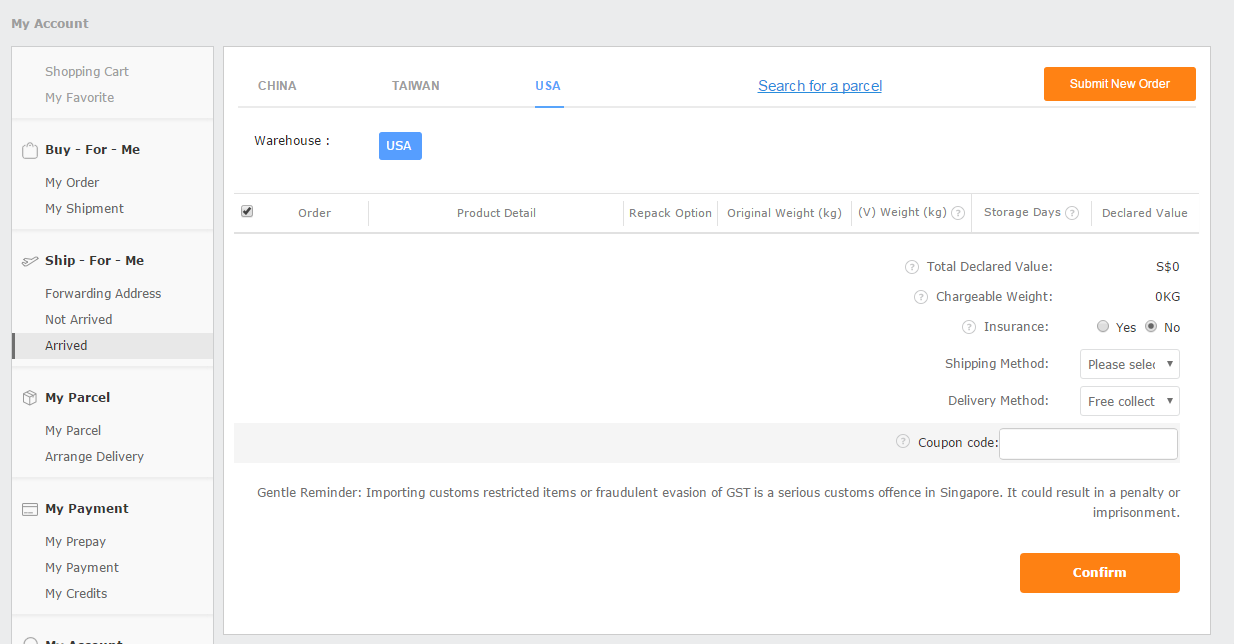
Login to ezBuy and select "Ship-For-Me -> Arrived".

Under the "USA" tab, you will see the total chargeable weight of the package. The rates (at time of article) are charged at S$ 3.99 per 500g (no base charge).

Choose your preferred delivery method, pay, receive the goods and enjoy!

For more help on the ezBuy purchasing guide.


* This is NOT a sponsored or paid article.



Monday, December 08, 2014

ComGateWay - The Ultimate Guide To Shopping Online (US)


Christmas is just around the corner. 


I have always enjoyed shopping online for great deals, especially during the Black Friday sales!

For the uninitiated, Black Friday is the day after thanks-giving in the United States. Why is this day so special? You may ask.

Well, because it's a day of major discounts and shopping! I guess it's also the day when the majority of USA goes shopping for their X'mas presents !

Whilst many U.S retailers do ship to Singapore, most of the times, the steep discounts will only be enjoyed when you buy and ship to the "U.S". (Do note the exchange rates, as in most cases, you will need to pay in USD)

Here comes the part which is more relevant to you. In the following section, I will guide you on some of my favourite retailers and how to use the ComGateWay freight forwarding.

I choose ComGateWay mainly because they are more reliable albeit more expensive than VPOST (aka SingPost).

In my opinion, it's really important that the goods arrive in 1 piece and without delays. Maybe i would just do another guide on VPOST for comparisons sake.

So here we go:

Some of the major U.S. sites that I buy from and are ComGateWay friendly:

Polo Ralph Lauren (Link)
- Up to 60% discounts 
(Really affordable Polo Tees)

Amazon (Link)
- 40-50% Discounts on computer parts 
(some items even ship for free to Singapore)

J.Crew (Link)
- Additional 30-40% off sale items
(Great quality shorts and shirts)

Bluefly (Link)
- Discounted designer bags 

Without further ado, lets go to the step-by-step guide of shopping/shipping using ComGateWay !.


1) Setup a ComGateWay account

ComGateWay do run promotion codes/discounts (Usually with DBS/POSB Cards) during the festive periods.

2) Take note of your U.S address (This is your SHIPPING Address)


Your ComGateWay Personalized Address
Your Personalised Address!

3) Buy from an online merchant that accepts international credit cards

* Not all merchants accept international cards. Mainly because they want to protect their distributors/agencies. 


A good example is how cheap COACH is in the US. Imagine if everyone just bought online !?! :))


Send To ComGateWay Address
Fill In Your ComGateWay Address

I will write a separate article on how to save a couple of bucks using the eBates rewards program. It is important that you read it here!.


4) Ship the goodies to your ComGateWay address

Simply ensure that you have shipped the items out to the ComGateWay address.


Trace Your Delivery
Track It!

5) Wait for your goodies to arrive at the ComGateWay warehouse

Once your goods have arrived at the warehouse, it will be processed and displayed on the "Packages at U.S Address" tab.


Here, you can access and view the merchant's invoice.


Checking the invoices
Check the invoice
Declare item values
Declare Package Values
Do note that packages with value SGD400.00 and above (Freight inclusive) will incur a 7% GST surcharge.

6) Consolidate your purchases, repack (if needed), and pay for the shipment

ComGateWay does provide re-packing service if:

  • The savings on international shipping is significant (after repacking fee: min 1kg)
  • Your purchase can be transported safely after the repack.


7) Patiently wait for the DHL/FedEx guy to arrive at your doorstep!

Enjoy your goodies! :)